

Steps
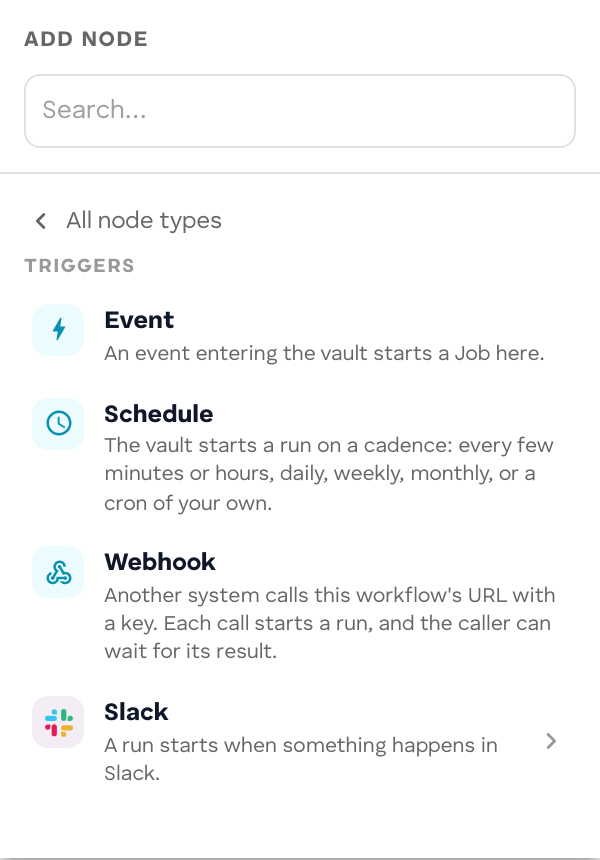
A workflow is built from 18 step kinds. In the Workflow Builder you add them from the Add node palette, which groups them by what they do. In code each step is an object in defineWorkflow’s nodes list with an id, a kind, and params.
Every step also takes:
| Field | What it is |
|---|---|
id |
Unique within the workflow. Edges and run records name it. |
label |
The name shown on the canvas and in run views. |
position |
{ x, y } on the canvas. The runner ignores it. |
Parameters marked as mappings accept "={{ $json.<path> }}" to read the carried item. See the carried item.
| Palette group | Builder step | Kind |
|---|---|---|
| Triggers | Event, Schedule, Webhook, one entry per connector | trigger |
| Flow | Branch, Filter | branch |
| Join | join |
|
| Split, Aggregate | split, aggregate |
|
| Human approval | human |
|
| Logic | Edit fields | transform |
| Code | code |
|
| Agents | Agent | agent |
| Models | Model | model |
| Actions | one entry per connector | action |
| Memory | Memory (Remember, Recall, Relate) | remember, recall, relate |
| Cubbies | Cubby (Query, Exec) | cubbyQuery, cubbyExec |
| Outputs | Event | publish |
| Result | output |
Triggers
Trigger
Kind: trigger. Where a run starts. A workflow needs at least one. The trigger’s output is the event’s payload, which becomes the first carried item.
| Builder entry | params.mode |
Starts a run when |
|---|---|---|
| Event | none | a workflow.start event targeted at the workflow arrives: the Run button, an app, another agent |
| Schedule | "schedule" |
the vault’s clock reaches a cron boundary |
| Webhook | "webhook" |
another system calls the workflow’s URL with a key |
| a connector (Slack, Telegram…) | "connector" |
a message arrives through a vault connection |
{ id: "ticket", kind: "trigger", label: "New ticket" }Parameters, limits, and payloads for each mode are on Triggers.
Flow
Branch
Kind: branch. Takes exactly one way out: the first outgoing edge whose condition passes, in edge order. An edge without a condition always passes, so put it last as the fallthrough.
In the Builder, a Branch has two outputs. The first carries the run when the condition holds; the second is the fallthrough. In code, conditions sit on the edges:
edges: [ { from: "route", to: "escalate", when: { field: "priority", op: "eq", value: "urgent" } }, { from: "route", to: "queue" },]A condition (when) tests one field of the item the branch received:
op |
Builder label | Passes when the field |
|---|---|---|
eq |
is | equals value |
ne |
is not | does not equal value |
gt / gte |
is greater than / is at least | is numerically greater / greater or equal |
lt / lte |
is less than / is at most | is numerically less / less or equal |
contains |
contains | is a string containing value |
exists |
has any value | is present and not empty |
field is a dot path (classification.category). A missing field fails every test except ne. A condition tests one field; to combine two, chain a second branch.
If no edge passes, the run ends stalled.
Any step, not only a branch, can have conditions on its edges. A non-branch step takes every edge whose condition passes, so two unconditional edges out of one step run both paths at once.
Filter
A Builder step that carries on only when its condition holds. It compiles to a branch with one conditional edge, so a run the filter stops ends stalled.
Join
Kind: join. Waits until every inbound edge has delivered, then continues once with the branches merged. Use it after a fan-out, for example three agents reviewing the same ticket.
The merged item holds every branch’s fields, applied in inbound edge order (later edges win on a clash), plus each branch’s whole item under its step id.
| Param | Builder label | Values |
|---|---|---|
require |
When a branch fails | "all" (default): a failed branch fails the run. "any": the join continues with the branches that answered, and a failed branch arrives as { failed: true, nodeId, error }. |
{ id: "panel", kind: "join", params: { require: "all" } }A step with two inbound edges and no join runs once per arrival. Use a join whenever branches must arrive together.
Split and Aggregate
Kinds: split, aggregate. Run the steps between them once per entry of a list, then collect the results. See Split and aggregate.
Human approval
Kind: human. Parks the run until people answer. Supports assignees, closing policies (any, all, { atLeast }), answer options, forms, and shared document editing. See People in workflows.
{ id: "approve", kind: "human", question: "=Refund {{ $json.amount }}?" }Logic
Logic steps change the item deterministically: the same input always gives the same output, with no model call, no network, and no clock. fetch, Date, performance, require, process, and globalThis are shadowed, so using one fails the step. item, JSON, and Math are in scope.
Edit fields
Kind: transform. One JavaScript expression over item; its value becomes the new item. A non-object result is wrapped as { value: … }.
| Builder mode | What it does |
|---|---|
| Fields | Set fields one by one from mappings, and choose under Other fields whether to keep the rest of the item or drop it. |
| Expression | Write the expression yourself (expr). |
| Review | Judge the step before and send it back with an objection. See Review a step. |
{ id: "normalise", kind: "transform", params: { expr: "({ ...item, customer: item.customer.trim().toLowerCase(), words: item.text.split(/\\s+/).length })" },}Code
Kind: code. A function body with statements, locals, loops, and an explicit return of the new item. Same scope and limits as Edit fields; use it when one expression is not enough.
{ id: "dedupe", kind: "code", params: { code: ` const seen = new Set(); const tickets = item.tickets.filter((t) => !seen.has(t.id) && seen.add(t.id)); console.log("kept", tickets.length); return { ...item, tickets }; `, },}- The body runs synchronously. Returning a Promise fails the step; use a model or agent step for anything that waits.
- Returning nothing fails the step.
console.loglines (up to 100) are recorded with the step’s run record.- A runaway loop holds the step until the Job’s idle timeout.
Agents
Agent
Kind: agent. Asks an agent of your Agent Service to do something, parks the run, and continues when the agent answers. The agent brings its own instructions, model, tools, and connections, can take several turns, and can ask a question back.
| Param | Builder label | What it does |
|---|---|---|
use |
Agent | The agent’s alias in your Agent Service, or a full agent id. Required. In the Builder, Choose an agent… picks one, Change picks another, and Open opens an LLM agent’s definition. |
prompt |
What to ask it | The request, usually a mapping. Empty: the agent receives the item and works from its own instructions. |
answer |
Answer it should give | JSON example of the answer’s shape, such as {"category": "billing"}. The step fails if the answer lacks any of its keys. |
| Ask the agent for this shape | Builder only, on by default: appends the shape to the request. | |
emit |
Event type sent to the agent. Default workflow.step. |
{ id: "classify", kind: "agent", use: "ticket-classifier", params: { prompt: "=Classify this ticket:\n{{ $json.text }}", answer: JSON.stringify({ category: "billing", priority: "normal" }), },}The agent receives the carried item with the resolved params (including prompt) on top, plus runId and nodeId.
Which agents a step can call. Any agent of your Agent Service:
- an LLM agent: one created in ROC with New agent, or an A2A agent you bring yourself;
- a code agent: the handler for the step’s event type (
workflow.stepby default) returns the answer.
Every agent a workflow calls must be connected to the vault too. Deploying and running from ROC connects them with the workflow.
Reading the answer. The answer becomes fields:
- An answer that is an object is used as is.
- A text answer is kept as
textandoutput, and the JSON object in it (fenced in```json, or embedded in prose) is parsed and its fields added.
The fields are merged over the carried item; on a clash the answer wins. With answer declared, an answer missing any declared key fails the step, naming the missing keys and what the agent produced. That keeps a wrong answer from silently taking the wrong branch three steps later. Declare answer for every field a later step or branch depends on; see Its answer.
When the agent asks a question. An agent that ends its turn needing input (A2A input-required) does not move the run on. The run parks with the agent’s question; someone answers it from the run in ROC, and the answer goes back to the agent in the same A2A context, so it keeps what it had worked out. An agent needing authorization (auth-required) parks the same way until someone grants it and runs the step again. A step gives up after 12 exchanges without a final answer.
When the agent fails. A failed agent fails the run at that step, unless the step feeds a join set to carry on with the branches that answered. See Join.
Models
Model
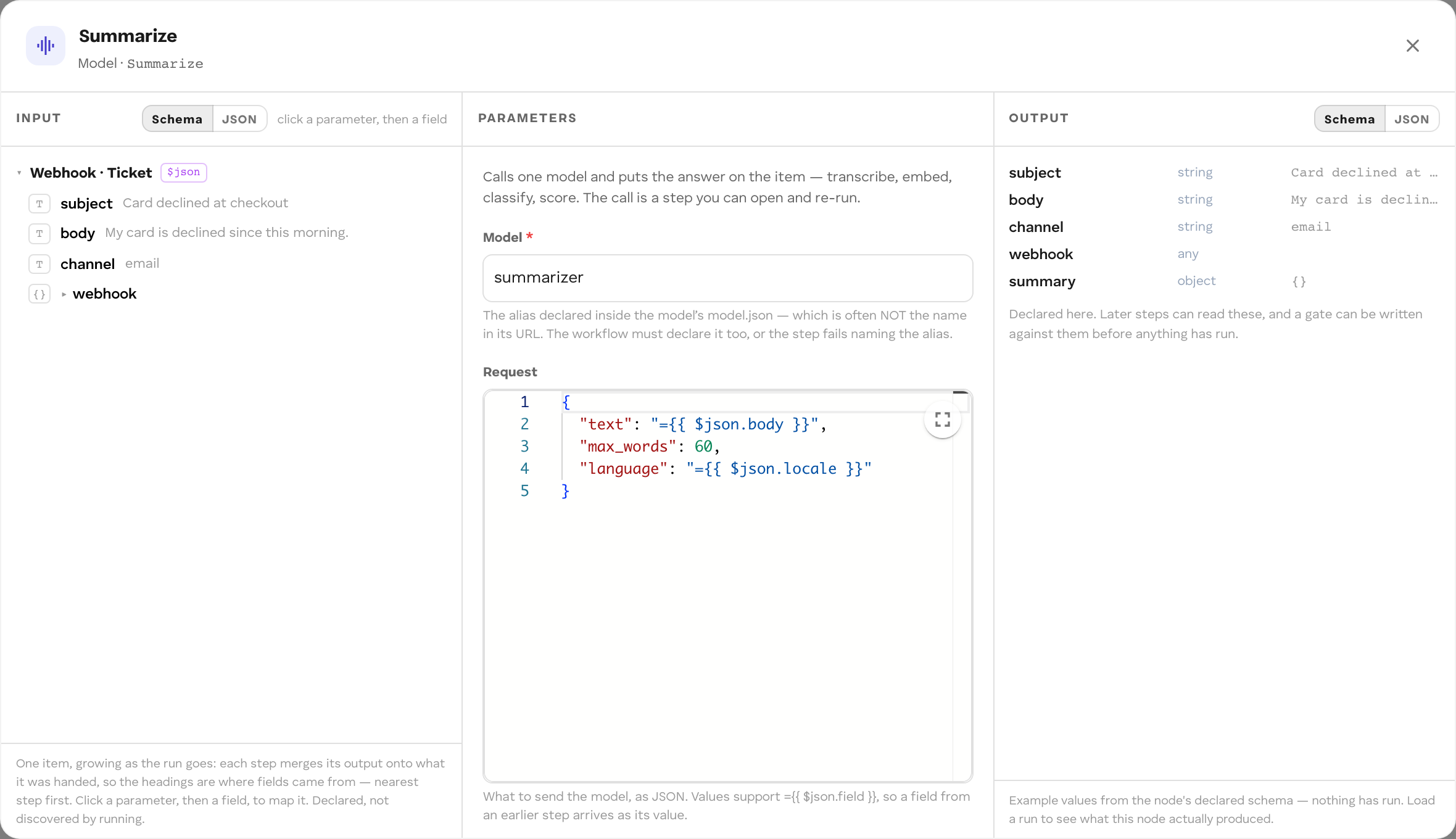
Kind: model. Calls one model once and puts the answer on the item under into; the rest of the item is kept. No back-and-forth, no tools, no memory of its own. What models are, the catalogue, and the input fields are on Models.
| Use a model step when | Use an agent step when |
|---|---|
| The task is one call: transcribe, embed, classify, extract, summarise. | The task needs judgement across several turns, tools, or connections. |
| You want each call visible and re-runnable as its own step. | You want to reuse an agent other workflows and apps also use. |
| You can write the whole request from the item. | The agent’s instructions are long or change independently of the workflow. |
| Param | Builder label | Default | What it does |
|---|---|---|---|
alias |
Model | required | The model alias. The workflow must declare it in models; cef build refuses a model step whose alias is not there. See Declare an alias. |
input |
Request | {} |
The request object, in the model’s own input schema. Values can be mappings, at any depth. |
into |
Answer field | output |
Where the answer lands. |
each |
Call once per item | false |
Call once per entry of a list. |
over |
List field | the item itself | The list field to iterate when each is on. |
{ id: "classify", kind: "model", label: "Classify the ticket", params: { alias: "llm", input: { messages: [ { role: "system", content: "You triage support tickets." }, { role: "user", content: "=Classify as billing, bug or question:\n\n{{ $json.text }}" }, ], max_tokens: 64, }, into: "classification", },}A language model answers with { text }, so the next step reads $json.classification.text. Set max_tokens: long answers are cut off at the model’s default budget.
input can also be JSON text of an object (what the Builder’s Request editor saves), or a single mapping such as "={{ $json.request }}" that resolves to an object an earlier step built. Anything else fails the step before the model is called.
Structured output. Ask a language model for JSON constrained to a schema with response_format:
input: { messages: [{ role: "user", content: "=Classify this ticket:\n{{ $json.text }}" }], max_tokens: 128, response_format: { type: "json_schema", schema: { type: "object", properties: { category: { type: "string", enum: ["billing", "bug", "question"] }, priority: { type: "string", enum: ["low", "normal", "urgent"] }, }, required: ["category", "priority"], }, },},into: "classification",The answer is still text. Parse it in the next step so later steps and branches can read fields:
{ id: "parse", kind: "transform", params: { expr: "({ ...item, ...JSON.parse(item.classification.text) })" } }response_format: { "type": "json_object" } asks for any valid JSON without a schema. See Structured output.
Once per list entry. With each: true the step calls the model once per entry of over, one after another, and collects the answers as a list under into (default results). Each answer carries the itemIndex of the entry that produced it. Each entry’s fields are spread over the item for that call, so ={{ $json.url }} reads the current entry’s url; an entry that is not an object is $json.item.
{ id: "transcribe", kind: "model", params: { alias: "asr", each: true, over: "chunks", input: { audio: "={{ $json.url }}" }, into: "transcripts" },}If over is missing or not a list, the step fails naming the field. For several steps per entry, or waits per entry, use Split and aggregate.
Failures. A model call that fails in transport (a 5xx, a timeout, a dropped connection) is retried up to 3 attempts in total, after 0.4 s and 1.6 s. A 4xx (a bad request, an undeclared alias) fails the step at once.
Actions
Connector action
Kind: action. Does one thing in an external system through a vault connection: post to Slack, send an email, message a Telegram chat. The vault holds the connection’s credentials and makes the call; the workflow only names the connection, the action, and the input. Adding the step in the Builder, and the access Deploy grants, are on Connectors.
| Param | What it does |
|---|---|
connection |
The connection’s id. Required. |
action |
The action name, such as send_message. Required. |
input |
An object with one key per input field of the action. Values can be mappings; a value that resolves to nothing is left out. |
{ id: "notify", kind: "action", label: "Tell the support channel", params: { connection: "<connectionId>", action: "send_message", input: { channel: "C0123456", text: "=New {{ $json.category }} ticket {{ $json.ticketId }}: {{ $json.summary }}", }, },}| Connector | Actions | Events (for connector triggers) |
|---|---|---|
| Slack | send_message, send_dm, update_message, add_reaction |
message.received |
| Telegram | send_message |
message.received |
| Email (SMTP) | send_email |
none |
| MCP server | discovered from the connected server | none |
The exact input fields of each action are shown in the step’s panel. The vault’s connector catalogue is public: GET /api/v1/connectors.
The step parks the run until the vault answers, like an agent step. On success, the action’s output fields are merged over the carried item. On failure, the run fails at the step with the vault’s error code and message:
| Error code | Meaning |
|---|---|
connection_not_found |
No such connection in this vault. |
connection_revoked |
The connection was revoked. |
scope_not_allowed |
The connection is not usable in the workflow’s scope. |
no_access |
The workflow has no grant for this action, or is no longer connected. |
action_unknown |
The connector has no such action. |
invalid_input |
The input does not match the action’s fields. |
provider_error |
The external system refused or failed. |
timeout |
The external system did not answer in time. |
A person answering the run can send it back to a connector action step to try again, for example after the vault owner reconnects an account. See Send a run back.
Memory
Memory steps read and write the vault’s Memory Bank: typed, durable records that later runs and other workflows can read, subject to the connection’s grants. In the Builder they are one Memory step with an Operation of Remember, Recall, or Relate.
Writes are checked by reading back through the same grants. If the vault’s connection does not allow the scope or privacy level, the step fails and says so instead of silently writing nothing.
Remember
Kind: remember. Writes one record. Idempotent on id: writing the same id again updates the record instead of adding a second.
| Param | Builder label | Default | What it does |
|---|---|---|---|
scope |
Scope | required | The grant scope the record lives in. |
privacy |
Privacy | public, internal, private, or restricted. |
|
type |
Record type | record |
The record’s type. |
id |
One record per | <runId>:<stepId> |
The record id; a mapping makes one record per value. |
title |
Title | the id | A mapping or text. |
body |
the whole item as JSON | A mapping or text. |
{ id: "file", kind: "remember", params: { scope: "default", privacy: "internal", type: "ticket-triage", id: "={{ $json.ticketId }}", title: "={{ $json.summary }}" },}Recall
Kind: recall. Searches the Memory Bank and adds the matching records to the item.
| Param | Builder label | Default | What it does |
|---|---|---|---|
match |
Search for | required | Search text; usually a mapping. |
limit |
Most rows | 50 | Most records returned. |
into |
Field name | recalled |
Where the records land; <into>Count holds their number. |
bodies |
false |
Also read each record’s body. | |
maxBodyChars |
2000 | Longest body kept per record when bodies is on. |
Relate
Kind: relate. Draws a typed, directed edge between two records.
| Param | Builder label | Default | What it does |
|---|---|---|---|
from |
From record | required | Source record id; usually a mapping. |
to |
To record | required | Target record id. |
type |
Edge type | related |
The relation’s type. |
scope, privacy |
Scope, Privacy | As for Remember. |
Cubbies
Cubby query and Cubby exec
Kinds: cubbyQuery, cubbyExec. Read or write a SQL cubby your Agent Service declares. In the Builder both are one Cubby step; its Operation is Query — read rows back or Exec — write, or change the schema.
| Kind | Does | Adds to the carried item |
|---|---|---|
cubbyQuery |
Runs a SELECT and returns rows. |
<into> (the rows, a list) and <into>Count. into defaults to rows. |
cubbyExec |
Runs an INSERT, UPDATE, DELETE, or other statement. |
cubbyChanged: the number of rows changed. |
| Param | Builder label | What it is |
|---|---|---|
alias |
Cubby | The cubby to use. Required. |
sql |
SQL | One SQL statement, with ? for every value. Required. |
args |
Values | One value per ?, in order (one per line in the Builder). Usually mappings such as "={{ $json.ticketId }}". |
into |
Rows land on | cubbyQuery only: the field the rows land on. |
{ id: "save", kind: "cubbyExec", label: "Record the triage result", params: { alias: "triage", sql: "INSERT INTO triage_tickets (run_id, ticket_id, category, ts) VALUES ('{{ $runId }}', ?, ?, ?)", args: ["={{ $json.ticketId }}", "={{ $json.category }}", "={{ $json.receivedAt }}"], },},{ id: "history", kind: "cubbyQuery", label: "Earlier tickets from this customer", params: { alias: "triage", sql: "SELECT ticket_id, category FROM triage_tickets WHERE customer = ? ORDER BY ts DESC LIMIT 20", args: ["={{ $json.customer }}"], into: "previous", },},After history, $json.previous holds the rows and $json.previousCount their number.
Values go in args, never in the SQL. A {{ $json.… }} inside sql fails the step: the run’s data comes from outside (a webhook body, a Slack message) and splicing it into SQL is an injection. Put ? in the statement and the value in args, where the platform binds it. An args value that resolves to an object is sent as its JSON text; a list of plain values is sent joined with "; ".
{{ $runId }} is the one template allowed inside sql: the run’s own id. Write it inside quotes, as in the example. Store it on every row a run writes, so a widget pinned to the workflow can select that run’s rows with WHERE run_id = ?.
Declaring a cubby and inspecting its data are on Cubbies; migration rules are on Cubby schema and migrations. A run’s view shows the cubby calls each step made; see Monitor runs.
Outputs
Event (publish)
Kind: publish. Publishes an event into the run’s scope, so another workflow, agent, or app subscribed to that type receives the result. This is how workflows compose: one publishes, the other is triggered on its own terms.
| Param | Builder label | Default | What it does |
|---|---|---|---|
event |
Event type | workflow.result |
The event type. Changing it breaks subscribers. |
payload |
What the event carries | the whole item | A JSON example object as text. Only its keys are published, taken from the item. |
{ id: "announce", kind: "publish", params: { event: "ticket.triaged", payload: JSON.stringify({ ticketId: "", category: "", priority: "" }) },}The published payload also carries runId. Declare payload so a publish never broadcasts the whole item.
Result
Kind: output. Ends a branch of the run and declares what the run returns: the webhook response, and what evaluations score.
| Param | Builder label | What it does |
|---|---|---|
result |
Where each field comes from | { field: mapping }. The run’s output becomes exactly these fields. |
resultTypes |
{ field: "string" | "number" | "boolean" | "object" | "array" }. A resolved value of another type fails the run at this step. |
|
outcome |
Outcome | An optional label for how the run ended, such as "escalated"; can be a mapping. |
{ id: "result", kind: "output", params: { result: { category: "={{ $json.category }}", priority: "={{ $json.priority }}" }, resultTypes: { category: "string", priority: "string" }, outcome: "triaged", },}Without result, the run’s output is the carried item as it reached the step. A step with no outgoing edges also ends the run with the item it produced.
Review a step
An Agent or Edit fields step can judge an earlier Agent step and send it back to try again. Set:
| Param | Builder label | Default | What it does |
|---|---|---|---|
reviews |
Reviews the step / Judges which step | The step to judge, or "." for the step drawn into this one. |
|
feedback |
Objection field | feedback |
The field of this step’s output holding the objection. Empty means accepted. |
maxAttempts |
Attempts | 3 | Total tries for the judged step, the first included. |
accept |
Optional condition ({ field, op, value }) that accepts the answer when it passes. |
When the reviewer objects, the judged step is asked again with the objection as answer on its input. When attempts run out, the run does not fail and does not ship the rejected answer: it waits for a person, with the last objection as the question.
{ id: "check", kind: "transform", params: { expr: "({ ...item, feedback: ['billing', 'bug', 'question'].includes(item.category) ? '' : 'category must be billing, bug or question' })", reviews: "classify", maxAttempts: 2, },}Validation
The Builder’s Deploy, cef build, and the runner check a graph before it can run and refuse it with every problem listed: unknown kinds, duplicate ids, edges to unknown steps, a missing trigger, an agent step with no agent, a model step with no alias, a connector step with no connection or action, unmarked templates, cycles without a loop edge, invalid human-step params, and invalid regions. A step nothing leads to is reported but does not block.
Limits
| What | Limit |
|---|---|
| Input the run carries into an agent step | 1 MiB (1,048,576 bytes). A larger item fails the step. |
| Exchanges in one agent step (agent asks, person answers) | 12. The step then fails: “gave up after 12 exchanges without a final answer”. |
| Model call attempts | 3, transport failures only, 400 ms then 1600 ms apart |
| Connector action: time per attempt | 20 s. The attempt fails and is retried. Keep actions small. |
| Connector action: attempts | 5, with backoff. The step then fails with connector.action.failed; handle the failure path in the graph. |
| SQL in a cubby step | No {{ $json.… }} templates; only {{ $runId }}. Otherwise the step fails: “SQL may not interpolate the run’s data”. |