

Widgets
A widget is a screen your Agent Service publishes. It runs in the browser, acts as the signed-in person, and reads and writes the vault that person is working in. There is no backend of yours behind it and no copy of the data to hold.
What a widget does
- Shows results. Render rows from the service’s cubbies
and records from the vault’s Memory Bank. A widget
reads from exactly those two places: a named query with
sql, or one withtool. - Takes input. Record audio, upload a file, submit a form, and write it into the vault.
- Starts and follows work. Publish an event, or
workflow.starttargeted at one workflow, then follow that stream’s events as they arrive.
Because a widget acts as the person, everything it does lands under that person’s own access to the vault, never under a credential of yours.
Where a widget comes from
| Source | Declared in | Published by |
|---|---|---|
| An agent’s widget | widgets: [...] in the agent’s cef.config.ts |
cef push, with the agent |
| A service widget | Its own widget project | cef widget push |
ROC’s Widgets page lists every screen the service publishes.
With a workflow
A workflow’s cubby steps write rows; a widget is the screen onto them.
Pin it
Pin a service widget to a workflow and it opens from the end of the workflow, handed the run you are looking at, so it shows exactly that run’s rows. Build and publish the widget first: see Build a widget.
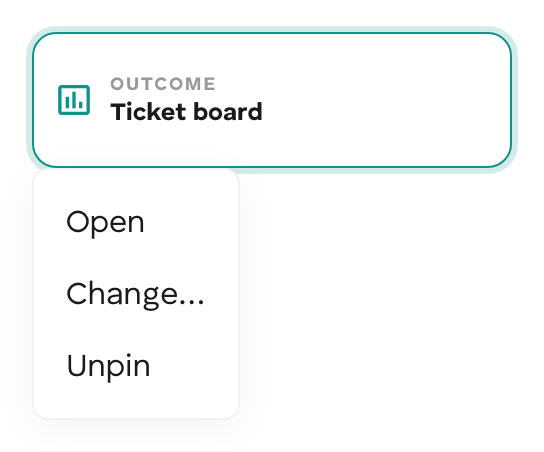
Every workflow canvas ends with an Outcome card.
- Click Pin a widget on the Outcome card. The picker lists the widgets your Agent Service has published.
- Pick one. The card shows the widget’s name; its menu has Open, Change…, and Unpin.
- Deploy. The pin is saved with the workflow’s canvas as
pinnedWidgetId.
The same pinned widget appears in the Summary panel of a run. Opening it from a run passes that run to the widget.
 A pin belongs to the Builder canvas. A workflow pushed from a repo has no canvas,
so it carries no pin.
A pin belongs to the Builder canvas. A workflow pushed from a repo has no canvas,
so it carries no pin.
Read the run it was opened for
When a person opens the pinned widget from a run, the host hands the widget a context:
| Field | Value |
|---|---|
runId |
The run’s id, run-<context>. The same value as {{ $runId }} in the workflow. |
vaultId |
The vault the run happened in. The widget reads that vault’s data, not the viewer’s own vault. |
const { context } = await window.WidgetRuntime.identity();const runId = context?.runId;
const result = await window.WidgetRuntime.query("by-run", [runId]);
with a query declared on the widget such as:
SELECT ticket_id, category, priority FROM triage_tickets WHERE run_id = ? ORDER BY ticket_idThis works because the workflow’s cubby steps write {{ $runId }} into a
run_id column; see
Steps: Cubby query and Cubby exec.
A share link to a widget carries the same values in its URL fragment:
#vault=<vaultId>&run=<runId>. Without a runId (opened directly, not from a
run), show the newest rows instead.
Start runs from it
Publish workflow.start with { target: "<agentServicePubkey>:<workflowId>" },
then subscribe to the stream for workflow.completed.
await WidgetRuntime.publish("workflow.start", input, requestId, { target: `${agentServicePubkey}:${workflowId}`,});const stop = WidgetRuntime.subscribe( requestId, { types: ["workflow.completed"] }, (events) => events.forEach(render),);With a code agent
Ship the widget with the agent: declare it in the agent’s widgets, and
cef push uploads it next to the bundle. It reads the cubbies the agent writes
with ctx.cubby, and publishes the events the agent’s @OnEvent handlers
handle. Until the reader’s vault has connected the agent, its queries fail with
AgentNotConnectedError; connectAgent() runs the connection. See
Build a widget.
The runtime
@cef-ai/widget-runtime is the browser half of every widget. It boots from the
manifest the CLI bakes, signs the reader in, and exposes
window.WidgetRuntime:
| Member | Does |
|---|---|
query |
Run a named query: sql against one of the service’s cubbies, or tool (search, get, neighbours, countByType) against the vault’s Memory Bank. |
publish |
Publish an event into the widget’s scope; pass { target } to address one agent or workflow. |
subscribe |
Follow one stream of the scope; new events arrive as ordered, de-duplicated batches. |
connect, connectAgent, agentStatus |
Connect an agent and check its connection. |
identity |
The resolved identity, and the vault and run a host named. |
The runtime also renders config-driven kinds (record, list, dashboard,
submit, conversation, composite) and carries the audio capture and upload
path. Fully custom pages use the same surface.
A widget framed by ROC or your own page gets the reader’s identity from the host; opened by direct link, it signs the reader in itself. See How the reader is signed in.
Build one
| Task | Page |
|---|---|
| Declare, write, run locally, and ship a widget | Build a widget |
| Render cubby rows and Memory Bank records, live | Visualize vault data |
| Capture input and files into the vault | Onboard data with a widget |
| Open it from a workflow’s runs | Pin it |