

Workflows
This group covers workflows end to end: the graph and its steps, authoring in the Builder or in code, and the workflow-only work of testing, evaluating, and monitoring runs, with best practices last.
A workflow is an agent whose behavior is a graph of steps instead of handler code. It has an id and versions, lives in your Agent Service, is published and deployed like any agent, and runs on a customer’s data only after the vault owner connects it. What it adds is the graph: steps that call models and agents, ask people, read and write cubbies and the Memory Bank, act through connectors, and decide where to go next.
You build a workflow in the ROC Workflow Builder or in TypeScript with defineWorkflow. Both produce the same document.
The graph
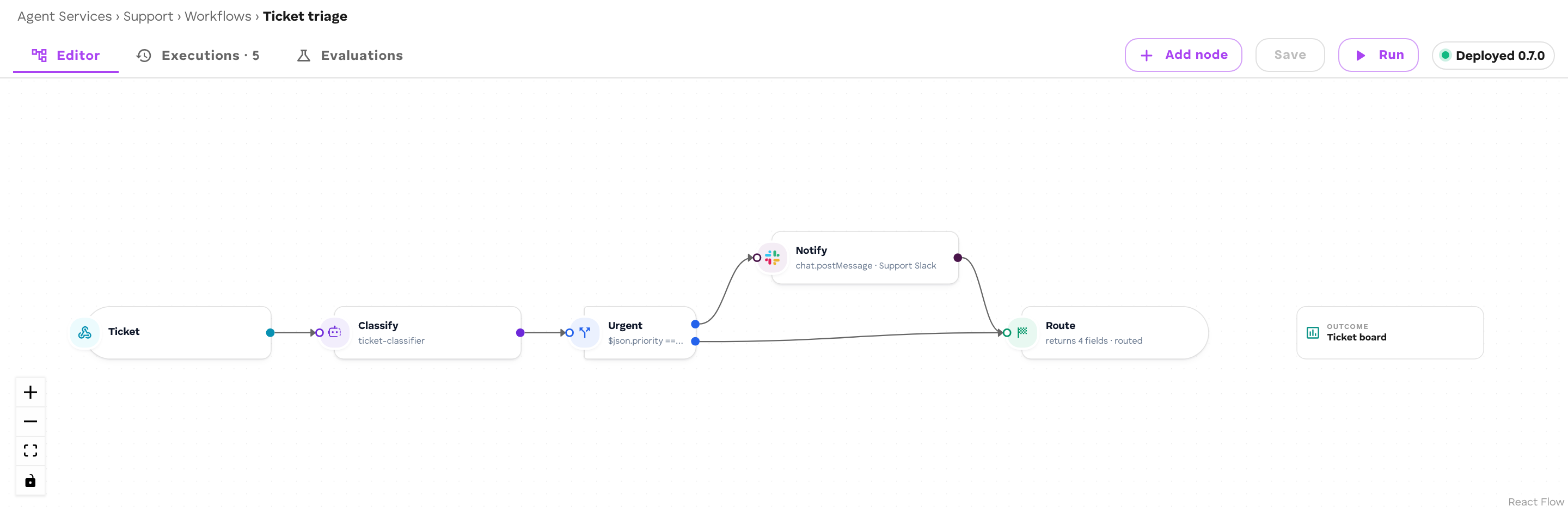
A workflow is a set of steps joined by edges.
trigger → classify (model) → branch ─┬→ escalate (human) → reply (connector action) └→ file (cubby exec) → result (output)- Every run starts at a trigger step: an event, a schedule, a webhook call, or a message arriving through a connector. See Triggers.
- Each step does one thing and hands the run on along its edges.
- An edge can carry a condition (
when): it is taken only when a field of the carried item passes the test. - A step with several edges out sends the run down all of them at once. A branch step instead takes the first edge whose condition passes. A join step waits for several branches and merges them.
- A cycle is allowed only through a loop edge, which carries a round limit.
Eighteen step kinds cover models, agents, people, data, memory, connectors, control flow, and results. See Steps.
The carried item
A run carries one JSON object from step to step: the item. The trigger’s payload is the first item. Each step reads it and passes on an updated version:
| Step | What it does to the item |
|---|---|
| Agent, human, connector action | Merges the answer’s fields over the item. On a name clash the answer wins. |
| Model, cubby query, recall | Adds the result under one field (into) and keeps everything else. |
| Edit fields (transform), code | Replaces the item with what the expression or code returns. |
| Join | Merges every branch’s item, in edge order, and adds each branch’s item under its step id. |
| Aggregate | Adds every per-item result under one field. |
A step’s parameters read the item through mappings: a string that starts with = and contains {{ $json.<path> }}.
params: { prompt: "=Summarise this ticket from {{ $json.customer }}:\n{{ $json.text }}" }- A whole-value mapping such as
"={{ $json.score }}"keeps the field’s type: a number stays a number. - Inside text, values are spliced in as strings.
- A missing field resolves to empty, not to an error.
- A string containing
{{ $json.… }}without the leading=is refused before the run starts, because it would be sent as literal text.
Beside $json, a mapping can read the run itself: {{ $runId }}, {{ $run.initiator }}, {{ $run.members }}, {{ $run.participants }}. See People in workflows.
Keep the item lean. A run holds the inputs of the steps it is waiting on in a 1 MiB budget; above that, the runner drops carried input from waiting steps, largest first. Store bulky data in a cubby or the Memory Bank and carry ids.
Runs
A run is one pass through the graph, started by one trigger event. Its record is a Job: every step that dispatches work adds a Task to it, with timings, tokens, and the step’s input and output. The run ends in one of these states:
| Status | Meaning |
|---|---|
running |
Steps are executing. |
waiting |
Parked on a person, an agent’s question, or an authorization. Costs nothing while it waits. |
done |
Reached its end. |
failed |
A step failed. The run records which step and why. |
stalled |
A step’s edges all had conditions and none passed. |
cancelled |
The person who started it closed it. |
Steps publish workflow.step_ran or workflow.step_failed into the run’s context as they finish, and the run ends with workflow.completed or workflow.failed. ROC’s Executions tab reads these. See Monitor runs.
Versions
Every deploy writes a new version of the workflow and makes it live. A run uses the version that was live when it started and keeps that graph to the end, so editing a workflow never changes a run already in flight. You can open any earlier version, or make it live again. See Monitor runs.
Builder or code
| Workflow Builder | defineWorkflow |
|
|---|---|---|
| Where | ROC, Agent Service → Workflows | cef.config.ts in your repo |
| Ship | Deploy button | cef build, cef push, cef deploy |
| Validation | Problems shown on the canvas; Deploy refuses a graph that cannot run | cef build refuses a graph that cannot run, and types catch edges to unknown steps |
| Review | Version history in ROC | Pull requests |
| Tests | Runs and evaluations in ROC | @cef-ai/testing plus evaluations |
The Builder’s Export as code produces a defineWorkflow file from a canvas, and a workflow pushed from code opens in the Builder read-only, with your step positions. See Workflows in code.
Workflow or code agent
Choose a workflow when:
- the work is a sequence of model calls, agent calls, and data steps you want to see and re-run step by step;
- people approve, correct, or decide in the middle;
- non-developers on your team need to read or change the flow;
- triggers are schedules, webhooks, or connector messages.
Choose a code agent when:
- you need long-lived session state or real-time streaming;
- the logic needs network calls, timers, or libraries inside one step (a workflow’s code step is deterministic: no network, no clock, no imports);
- you want one agent that a workflow calls as a step. A workflow can call your code agents and LLM agents through Agent steps.
See Agents and workflows for how the two compare at the platform level.