

Experiments
An experiment runs one dataset version against one workflow version and records every run’s output, scores, and metrics. Run one before you switch the live version, and after any change to a prompt, a model, or a step that shapes the Result.
Run an experiment in ROC
- Open the workflow and select Evaluations.
- Pick the dataset in the Dataset switcher.
- Select Run experiment and fill in the dialog.
| Field | Default | Meaning |
|---|---|---|
| Workflow version | The live version | The version to run. A version that is not live is pinned for this experiment’s runs only and unpinned when it ends. |
| Compare against | The dataset’s baseline | The experiment to judge this one against, or No baseline. |
| Note | empty | What changed in this version. Shown in the experiment list. |
| Repeats (Advanced) | 1 | Runs per case, 1 to 20. Use 3 or more for a model-heavy workflow to see flaky cases. |
| Concurrency (Advanced) | 4 | Runs in flight at once, 1 to 16. |
| Timeout (s) (Advanced) | 300 | How long one run may take to end, 10 to 3600 seconds. |
Before it starts, the dialog checks the cases against the Result the chosen version declares. A warning such as 11 cases expect “summary”, which this version does not return means those checks score n/a on that version, not failures. See Results.
ROC runs the experiment from your browser tab, in the vault of the organization that owns the Agent Service. Leaving the page does not stop it; closing or reloading the tab does (the browser asks first). An interrupted experiment stays Running in the list; open its menu and choose Resume, or Mark cancelled. Stop ends dispatching; runs already in flight finish.
Run an experiment with the CLI
cef eval run triage # latest dataset version × the live workflow versioncef eval run triage --workflow-version 1.5.0 --repeats 3 --note "shorter prompt"cef eval run triage --dataset-version 2 # an older dataset versioncef eval run triage --resume exp-mgfz8c1k-a1b2 # finish an interrupted experiment| Flag | Default | Meaning |
|---|---|---|
--dataset-version <n> |
Latest, cut automatically when the cases changed | Dataset version to run |
--workflow-version <v> |
The live version | A version that is not live is pinned for this experiment only |
--repeats <n> |
1 |
Runs per case |
--concurrency <n> |
4 |
Runs in flight at once |
--timeout <ms> |
300000 |
How long one run may take to end |
--baseline <exp> |
The dataset’s baseline | Experiment to compare against when done |
--resume <exp> |
Resume an experiment that did not finish | |
--note <text> |
Note recorded on the experiment | |
--vault <id> |
$CEF_VAULT_ID, else the wallet’s own vault |
Vault to run in |
--scope <scope> |
default |
Vault scope to publish into |
--access-token <token> |
$CEF_ACCESS_TOKEN |
CLI access token from ROC, for the orchestrator |
--orchestrator <url>, --vault-api <url> |
From --env |
Endpoint overrides |
--workflow <id> |
The workflow cef.config.ts (or dist/) declares |
Workflow id |
--json |
Print JSON instead of tables |
run prints each run as it finishes ([3/11] double-charge#1 pass), then the experiment summary, then the comparison with the baseline when there is one. It records the Result the version declares (from the live deployment when the version is live, otherwise from your project’s own graph of that version) and warns before starting about cases that expect fields the version no longer returns.
A resume is a new attempt: runs already on file are reused, the rest run in fresh contexts.
Credentials
Every cef eval command opens the Agent Service’s dataset bucket; run also reaches the vault and the orchestrator.
| Variable | Flag | Needed for |
|---|---|---|
CEF_AS_PUBKEY |
--as-pubkey |
Every command: names the bucket |
CEF_KEYSTORE + CEF_KEYSTORE_PASSWORD, or CEF_SECRET_PHRASE |
--keystore, --password, --secret-phrase |
The owner wallet (ed25519) that mints the store credential |
CEF_EVAL_KEY + CEF_EVAL_SECRET |
--access-key, --secret |
An explicit S3 key for the owner’s wallet, instead of the wallet |
CEF_ACCESS_TOKEN |
--access-token |
run: the CLI access token from ROC |
CEF_ENV |
--env |
dev, stage, or prod (default dev) |
The token cef push uses (CEF_DDC_ACCESS_TOKEN) cannot open dataset storage; cef eval says so if it is the only credential set. A minted store credential is cached for its hour in ~/.cef/eval-credentials.json; set CEF_EVAL_CREDENTIAL_CACHE to another file, or to off.
Read the results
The Experiments view shows, for the selected dataset:
| Element | What it tells you |
|---|---|
| Accuracy | Passed runs over all judged runs. Runs that errored count as failures here. |
| p50 duration, Tokens/run, Cost/run | Median wall-clock per run and the mean cost per run, each with its change against the baseline |
| Regressions | Cases worse than the baseline |
| History | One metric over time, one point per experiment; click a point to open it |
| Accuracy by field | Each Result field’s pass rate, latest experiment against the baseline |
| Verdict | One word per experiment (below) |
| Verdict | Meaning |
|---|---|
| Baseline | This is the experiment the others are compared to |
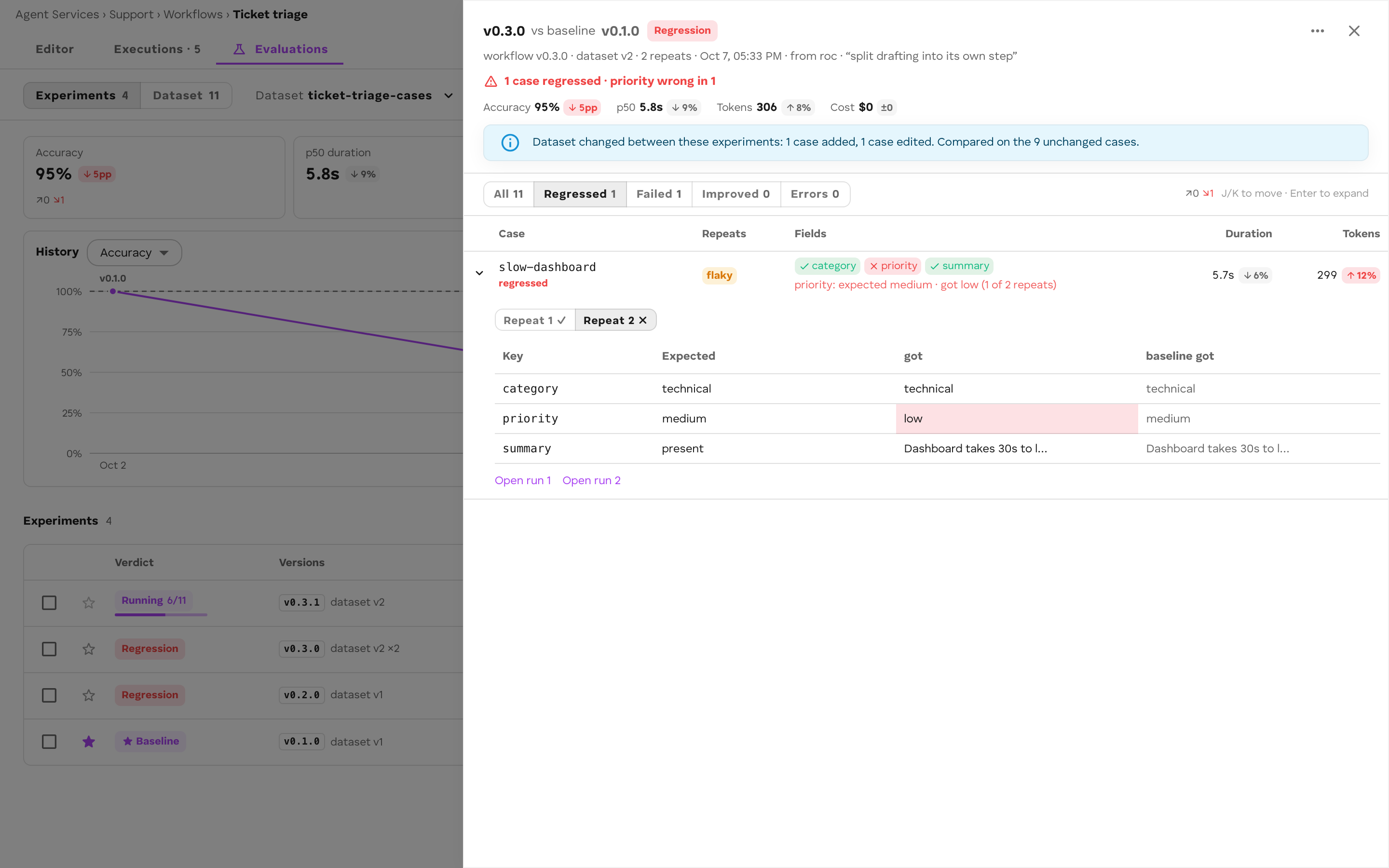
| Regression | A case got worse, or accuracy dropped, or only duration/tokens/cost got worse |
| Improvement | Something got better (a case, accuracy, or duration/tokens/cost beyond noise) and nothing got worse |
| Tradeoff | Better on one axis, worse on another |
| Same | No change beyond noise |
| No baseline | Nothing to compare with yet |
| Not compared | A baseline exists but the runs of one side could not be read |
| Running, Cancelled, Error | The experiment’s state |
Duration changes under 15% and token or cost changes under 10% count as noise. Accuracy has no noise band.
Open an experiment to see every case: its input, expected and actual fields, each repeat’s status (pass, fail, flaky, error, missing), and Open run, which takes you to that run in Executions.
Choose a baseline
The baseline is per dataset. In the experiment’s menu, choose Make baseline (only a finished experiment can be one). Until you choose one, ROC compares against the first finished experiment of the live version. The CLI compares against the stored baseline, or --baseline.
Good practice: run the dataset on the live version, make that experiment the baseline, and judge every candidate version against it. Move the baseline when you switch the live version.
Compare two experiments
In ROC, tick two experiments and select Compare, or choose Compare with baseline from an experiment’s menu.
With the CLI:
cef eval compare exp-mgfz8c1k-a1b2 exp-mgg0p2xq-9zt4The comparison lists accuracy, duration p50 and p95, tokens/run, cost/run, steps/run, and limit breaches for both sides with their deltas, then every run that changed (improved, regressed, only-in-base, only-in-candidate).
Only cases present on both sides at the same revision are compared. When the dataset changed between the two experiments, the comparison says so (Dataset changed between these experiments: 1 case added, 1 expectation edited. Compared on the 10 unchanged cases.) and leaves the changed cases out.
Use in CI
cef eval run exits non-zero only when it cannot run (bad flags, credentials, an unknown dataset). A regression does not fail the command. Read the JSON and decide:
cef eval run triage --workflow-version "$CANDIDATE" --repeats 3 --json > experiment.json
jq -e '.comparison == null or .comparison.counts.regressed == 0' experiment.jsonjq -e '.experiment.summary.passRate >= 0.9' experiment.json
The JSON is { experiment, result, comparison? }: the experiment with its summary, the Result compatibility check, and the comparison with the baseline when there is one.
summary.passRate is passed over passed + failed; runs the harness could not start (status: "error") are reported in summary.errored and are not in it. Check errored too, or ROC’s Accuracy and your CI gate will disagree.
Practical rules for CI:
- Run against a candidate version that is pushed but not live; the experiment pins it for its own runs only.
- Keep the CI dataset small (tens of cases) and the repeats low; run the full dataset before you switch the live version.
- Run in a vault reserved for testing. An experiment’s runs are real runs.